Why Your Website Gets Traffic but No Sales 10 Common Problems
Why Your Website Gets Traffic but No Sales 10 Common Problems
This post contains affiliate links. If you purchase through one of these links, we may earn a small commission at no extra cost to you.
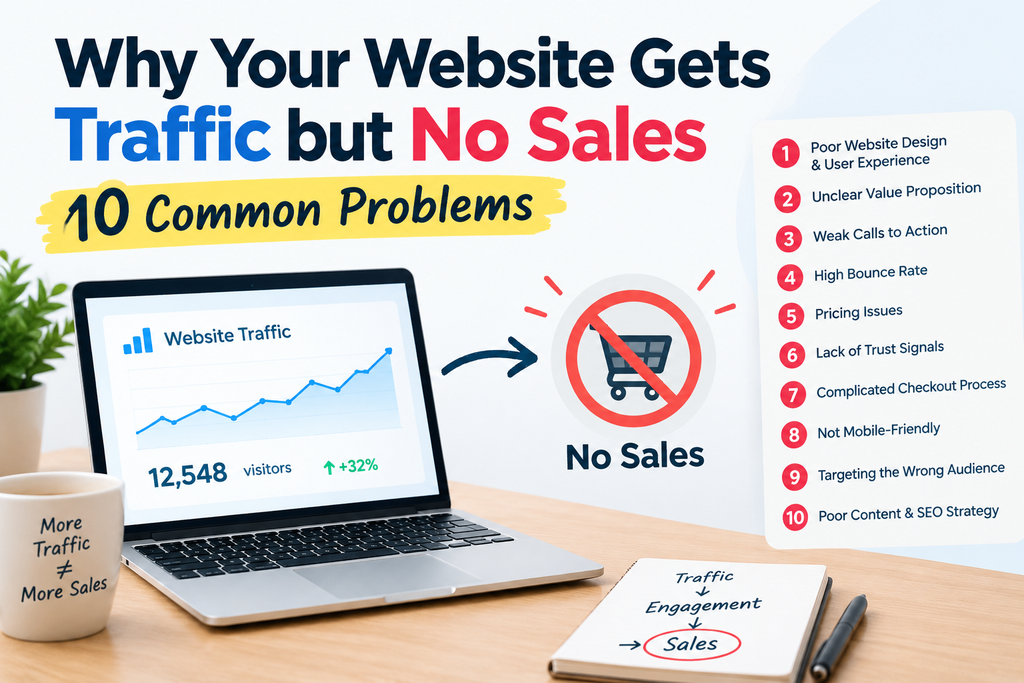
It’s one of the most frustrating positions to be in: your analytics show a steady stream of visitors, but your sales dashboard barely moves. When traffic isn’t the problem, something between “visitor arrives” and “visitor buys” is quietly breaking down. Here are the 10 most common culprits — and what to do about each one.
1. Your Value Proposition Isn’t Clear in the First Few Seconds
Visitors decide almost instantly whether a site is relevant to them. If someone lands on your homepage or a product page and can’t immediately tell what you sell, who it’s for, and why it matters, they’ll leave before scrolling further.
Fix it: Make sure your headline answers “what is this, and why should I care” without requiring a scroll. Avoid clever wordplay that sacrifices clarity.
2. Your Site Loads Too Slowly
Every additional second of load time increases the chance a visitor leaves before the page even finishes rendering — and that’s a lost sale you never get the chance to make.
Fix it: Compress images, remove unnecessary plugins or scripts, and test your load speed on both desktop and mobile. Aim to get key pages loading in under 2–3 seconds.
3. Your Checkout Process Has Too Much Friction
Forced account creation, excessive form fields, unclear shipping costs, or a checkout that takes multiple confusing steps all give a ready-to-buy visitor a reason to bail at the last moment — arguably the most expensive place in your funnel to lose someone.
Fix it: Walk through your own checkout as if you were a stranger and count every field and click required. Cut anything that isn’t essential, and offer guest checkout.
4. There’s No Real Trust Signal on the Page
New visitors are naturally cautious about handing over payment information to a site they’ve never used before. Without visible signs of legitimacy — reviews, secure checkout badges, a real returns policy, clear contact information — hesitation wins out over the purchase.
Fix it: Audit your product and checkout pages specifically for trust signals. If you don’t have reviews yet, prioritize collecting even a handful before scaling traffic further.
5. Your Traffic Doesn’t Match Your Offer
Not all traffic is created equal. Visitors coming from a broad, unrelated audience (a viral post, an unrelated influencer shoutout, poorly targeted ads) will show up in your analytics but rarely convert, because they were never actually looking for what you sell.
Fix it: Look at conversion rate by traffic source, not just total visits. If one channel brings volume but no sales, it’s likely a targeting mismatch rather than a site problem.
6. Your Price Isn’t Justified on the Page
If a product costs more than a visitor expected, and the page doesn’t make the case for why, they’ll leave to compare elsewhere — or simply assume it’s not worth it. Price objections are rarely solved by lowering price; they’re solved by better justifying the price you already have.
Fix it: Address value directly on the page: what makes this worth the cost, what’s included, and how it compares to cheaper alternatives.
7. You’re Not Following Up With People Who Don’t Buy Immediately
Most visitors won’t purchase on their first visit, no matter how good your page is. If you have no way to bring them back — no email capture, no retargeting, no cart recovery — you’re relying entirely on a single, low-probability moment to convert every single sale.
Fix it: Add an email capture offer for non-buyers and set up a basic retargeting or cart abandonment sequence to reach people after they leave.
8. Your Mobile Experience Is Worse Than Your Desktop Experience
If your site was designed and tested primarily on desktop, mobile visitors — who often make up the majority of traffic — may be hitting broken layouts, tiny buttons, or a checkout that’s genuinely difficult to complete on a phone.
Fix it: Go through your entire buying journey on your own phone, start to finish, and fix any point that requires excessive pinching, zooming, or retyping.
9. Your Product Pages Answer “What” but Not “Why”
A page full of specifications tells a visitor what they’d be buying, but doesn’t make the emotional or practical case for why they need it. Without that, even interested visitors talk themselves out of the purchase.
Fix it: For each product, add a short section connecting the features to a real outcome or problem solved — what changes for the customer once they own this.
10. You’re Not Actually Testing Anything
Many sites run for months (or years) without ever testing a headline, button color, page layout, or offer — meaning any conversion problems that exist have simply never been identified, let alone fixed.
Fix it: Pick one high-traffic page and test a single variable at a time — headline, primary image, or call-to-action wording — rather than assuming your current version is optimal by default.
How to Diagnose Your Specific Problem
Rather than guessing which of these applies to you, work through your funnel in order and look for where the numbers actually drop:
| Where visitors drop off | Most likely problem |
|---|---|
| High bounce rate on landing pages | #1, #2, #5 — unclear value, slow load, or mismatched traffic |
| Visitors browse but never add to cart | #4, #6, #9 — missing trust, unjustified price, or weak product pages |
| Items added to cart but never purchased | #3 — checkout friction |
| Similar problem specifically on phones | #8 — mobile experience |
| One-time visitors who never return | #7 — no follow-up system |
Fixing the earliest point of drop-off in this chain usually has the biggest impact, since improvements downstream can’t help visitors who already left further up the funnel.
Frequently Asked Questions
How do I know if my traffic quality is the actual problem? Check your conversion rate broken down by traffic source. If certain channels convert reasonably well while others convert near zero, the issue is usually traffic mismatch rather than your website itself.
Should I focus on more traffic or fixing conversion first? If you’re already getting meaningful traffic with a low conversion rate, fixing conversion is almost always the faster and cheaper win — you’re improving results on visitors you’re already paying to attract.
How much traffic do I need before conversion data becomes meaningful? As a rough guideline, wait for at least a few hundred visitors to a specific page before drawing firm conclusions from its conversion rate — smaller sample sizes can be misleading.
What’s the fastest fix on this list to implement? Trust signals (#4) and clarifying your value proposition (#1) can usually be improved within a day or two and often show a quick, visible impact on conversion.
Disclosure: This article contains affiliate links. As an affiliate, we may earn a commission from qualifying purchases, at no additional cost to you.